ReGen Bridge v1

Your field devices already have a web interface. Now you can actually reach it.

Plug the bridge into any IP device on site, connect it to the RemoteGenius platform, and log into that device’s own interface from your browser — from anywhere. No public IP, no port forwarding, no VPN client, no site visit. Setup takes under five minutes.

Outbound-only connection Nothing listens on the internet CE / FCC IP65 milled aluminium enclosure Self-hosted or RemoteGenius-hosted

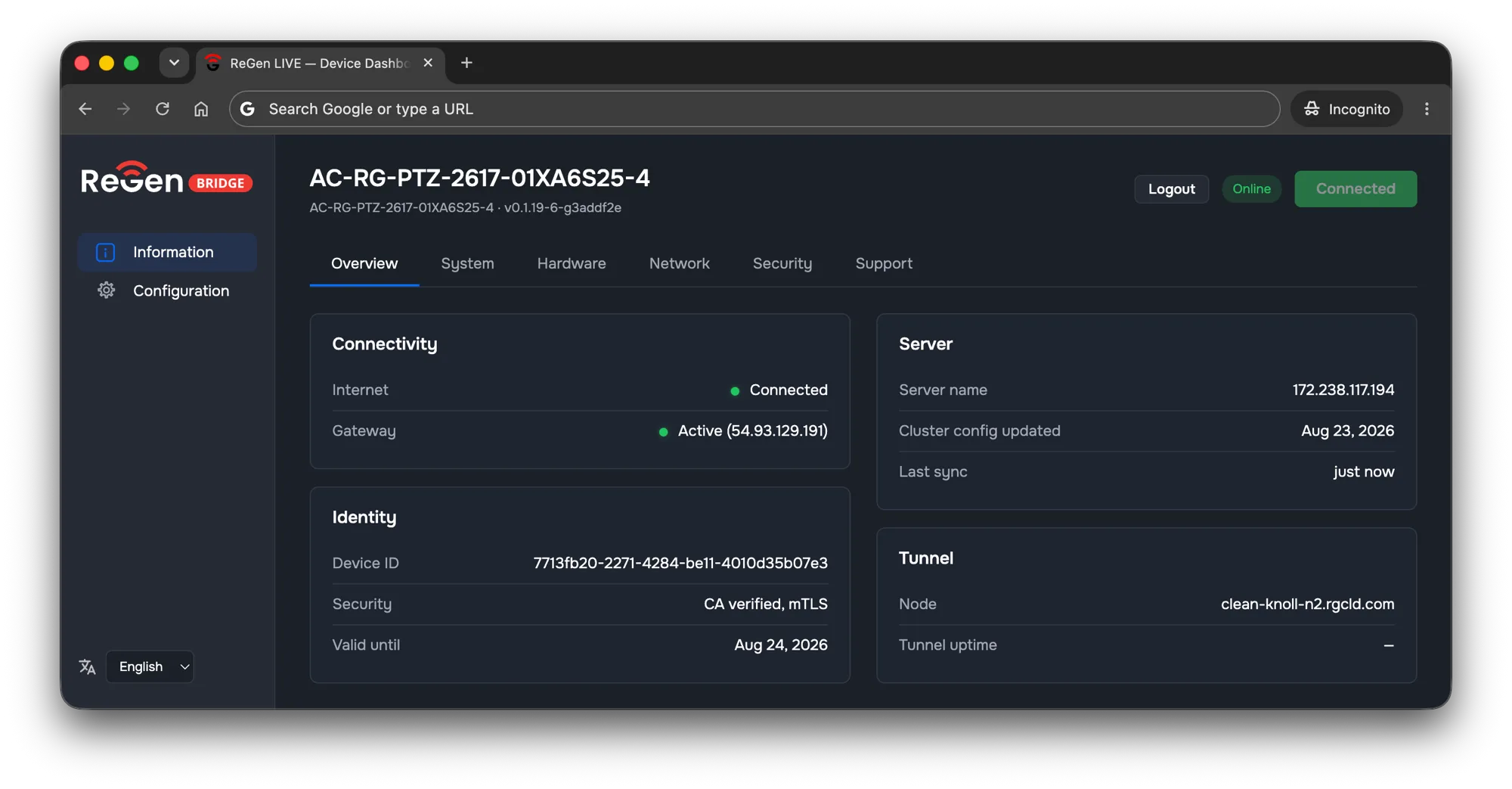
RemoteGenius dashboard showing a field device’s bridge status: connectivity, identity, server and tunnel details
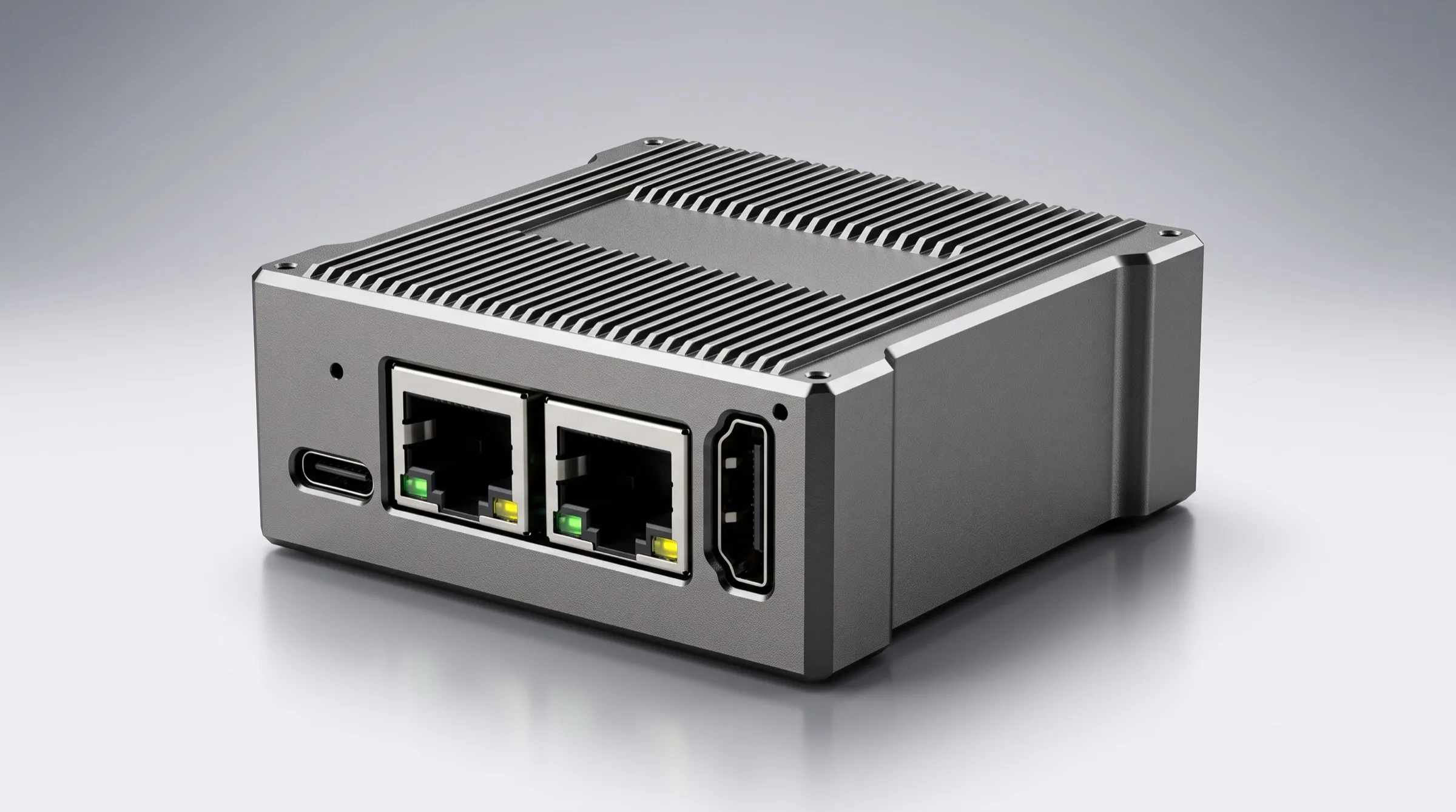
ReGen Bridge v1 — milled aluminium IP65 bridge device with dual Gigabit Ethernet ports

The device works fine. Getting to it is the whole job.

Encoders, cameras, switches, controllers, gateways — almost all of them ship with a perfectly good web interface. That interface is also the only real way to configure them, and it only works if you are standing on the same network.

So the moment the device is on a cellular link, behind carrier-grade NAT, inside a customer’s firewall, or on an isolated plant network, the options get expensive fast:

  • Send an engineer to site to change one setting.
  • Ask for a static IP and a forwarded port — and put the device’s login page on the open internet.
  • Build a VPN and a jump host, then maintain credentials, routes and firewall exceptions for every site forever.
  • Give up and manage the device by phone call with whoever happens to be nearby.

None of these scale past a few dozen sites, and two of them are the reason your security team says no.

The average cost of “just push the button” is a day of travel.

Three steps. Under five minutes. Then it’s just a browser tab.

  1. Connect the device

    Plug the device into the bridge’s device port. The bridge runs its own isolated network for that device, so nothing about the site’s addressing has to change.

  2. Give the bridge internet

    Second port to the site uplink — office LAN, plant network, cellular router, whatever is available. Only outbound access is needed. No firewall rule, no forwarded port, no static IP.

  3. Pair it

    Open the bridge’s local setup page, take the six-character code, and approve it in your RemoteGenius dashboard. The bridge generates its own identity on the spot — there is no shared secret to distribute, and no key material ever leaves the device.

From then on, the device shows up in your dashboard and its own interface opens in your browser. No client software on your laptop.

Full control, not a status page.

The device’s own interface, in your browser

Not a limited subset — the actual native interface the vendor shipped, at its own private address, behind your organisation’s login. If you can do it on site, you can do it from your desk. This is why there is no “unsupported device” tier.

Settings you can trust

The platform keeps a live picture of the device’s configuration, an append-only record of every change and who made it, and previous versions you can restore. Configuration drift becomes something you can see and undo instead of something you discover during an outage.

Health you don’t have to ask for

Each bridge reports connectivity, link state, round-trip time and uptime on its own. If the site goes offline, the bridge keeps recording locally and uploads the gap when it comes back, so you can see what happened while you were blind.

Device passwords, managed centrally

Set a password policy per device — including automatic rotation — and let the platform push and enforce it. No more shared spreadsheet of admin credentials.

Users, roles and an audit trail

Named accounts with two-factor authentication, role-based permissions per site, and an exportable audit log of who did what, when, to which device.

Live video preview

For cameras and encoders, watch the stream directly in the dashboard to confirm what the device is actually doing. Sessions release themselves after 30 minutes idle.

Pan, tilt, zoom and presets

For PTZ cameras with ONVIF support: full PTZ control including focus and imaging, with verified preset recall and a safety watchdog that stops motion if an operator’s session drops — no cameras left spinning.

Nothing on your site listens to the internet.

The bridge only ever dials out. There is no inbound connection to it, no forwarded port, no exposed login page, and no path from the platform down to your network that your firewall didn’t already permit outbound. That is an architectural property, not a configuration you have to get right.

  • Outbound-only by design. The platform cannot initiate a connection to your site. Ever.
  • No pre-shared secrets. The bridge creates its own key material during pairing and keeps the private half. Pairing codes expire in five minutes, are rate-limited, and lock out after repeated failures.
  • A human approves every bridge. A device is not attached to your account until someone with permission says yes.
  • Isolated device network. The connected device sits on the bridge’s own segment, not on the site LAN.
  • Rotating credentials. Device certificates and tokens renew automatically, well before expiry.
  • Tenant isolation. Devices belonging to another organisation are not merely forbidden — they are invisible.
  • Signed updates only. Bridge software updates are cryptographically verified before install and roll back automatically if the bridge doesn’t come back healthy.
  • Your data path is yours. The bridge talks to your cluster and nothing else. If you self-host that cluster, traffic never touches RemoteGenius infrastructure.

Our cloud, your cloud, your rack, or no network at all.

RemoteGenius-hosted

We provision and operate a dedicated cluster for you on AWS, DigitalOcean, Hetzner or Linode. Pick the provider and region that satisfies your data-residency requirements.

Self-hosted

Run the cluster on your own infrastructure or on-premises. Same platform, same dashboard, your hardware.

Keeps working when the cloud doesn’t

Your cluster owns its own accounts, permissions and audit log. If the wider internet or our billing layer is unreachable, you keep logging in and keep operating your devices.

Air-gapped deployments

Fully disconnected sites are supported: operators and permissions are provisioned by signed transfer file rather than a live connection. Available through our engineering team — talk to us about your environment.

If it has a web interface, we can manage it.

Deep integration — structured settings, telemetry, live preview, restore points — is delivered by device adapters. A set of adapters ships with the platform, and every other device is still fully usable from day one through its native interface.

Need first-class support for a device we haven’t covered? Give our engineering team network access to one unit and a custom adapter is typically delivered in 3–5 working days. There is no certification programme to join and no waiting list.

Rated for the cabinet, the plant floor and the truck.

ReGen Bridge v1
Enclosure Milled aluminium alloy, IP65 rated
Ports Dual Gigabit Ethernet — one for the managed device, one for the uplink
Compliance CE, FCC
Managed devices One device per bridge
Deployment Wired, cellular, or any uplink with outbound internet access

One bridge, one device — so a failure, a move or a decommission affects exactly one thing, and your cost tracks your fleet one-for-one.

A hundred sites shouldn’t be a hundred jobs.

  • Opt-in automatic updates. Bridges can update themselves on a signed, verified release channel — but only if you turn it on. Nothing changes in the field without your consent.
  • Replace hardware cleanly. Swap the bridge; the platform detects the takeover and retires the old record for the connected device in the same cluster.
  • Multi-uplink failover (opt-in). Where a bridge has two paths to the internet, it can detect carrier loss in about two seconds and switch, then fail back only after the primary link has been continuously healthy. Off by default; enable per site.
  • Direct bridge access (opt-in). Command-line access to the bridge itself, through the same outbound tunnel, for teams that want it. Off by default.
  • Enforced password change on first login (opt-in). Require the factory password to be replaced before the bridge’s local page can be used.

Built for the teams that own the last mile.

Network operations

Customer-premises equipment behind someone else’s firewall, on connections you don’t control. Reach every managed box’s own interface without asking a customer to open a port, and without shipping a VPN appliance to every site.

Industrial & OT

Plant networks that are isolated for good reasons. The bridge adds remote reach without adding an inbound door, keeps the managed device on its own segment, and gives you a named, auditable record of every configuration change — including on sites with no permanent connectivity at all.

Broadcast

Encoders and cameras at venues, remotes and unmanned sites. Confirm the stream in your browser, adjust the encoder through its real interface, drive PTZ and presets, and restore a known-good configuration when someone changes something ninety seconds before air.

€/$99 per bridge. Platform subscription billed separately.

  • ReGen Bridge v1 — $99 per unit. One managed device per bridge. Price is before sales tax / VAT.
  • Platform subscription Priced per managed device, plus the cost of the cloud infrastructure your cluster runs on. Self-hosting removes the infrastructure line.
  • Lead time: 45 days From order.

All prices are before sales tax / VAT.

Questions we hear before the first order.

Do I need to open a port or set up a VPN?

No. The bridge makes an outbound connection only. Nothing at your site accepts an inbound connection from us.

Does it really take five minutes?

Connect the device, connect the uplink, enter a pairing code and approve it. That’s the whole procedure, and it needs no networking expertise on site — which matters when the person at the site is a contractor, not your engineer.

What happens when the site loses connectivity?

The bridge keeps trying to reconnect indefinitely and records health data locally while it’s dark. When the link returns, it reconnects on its own and uploads what you missed. No one has to go and reboot anything.

How many devices can one bridge manage?

One. The bridge is intentionally a per-device unit.

Is my device supported?

If it has a web interface, yes — you can use it through the platform immediately. Deeper integration comes from adapters; several ship with the platform, and custom adapters are typically delivered in 3–5 working days.

Can I run this entirely on my own infrastructure?

Yes — self-hosted and on-premises deployments are supported, and fully air-gapped sites can be provisioned by signed file transfer.

Can I resell this under my own brand?

White-labelling is available for service providers. Contact sales to discuss terms.

When will I get it?

Lead time is 45 days from order.

Stop driving to sites to click buttons.

One bridge, one device, five minutes. $99 each (before sales tax / VAT), 45-day lead time.